
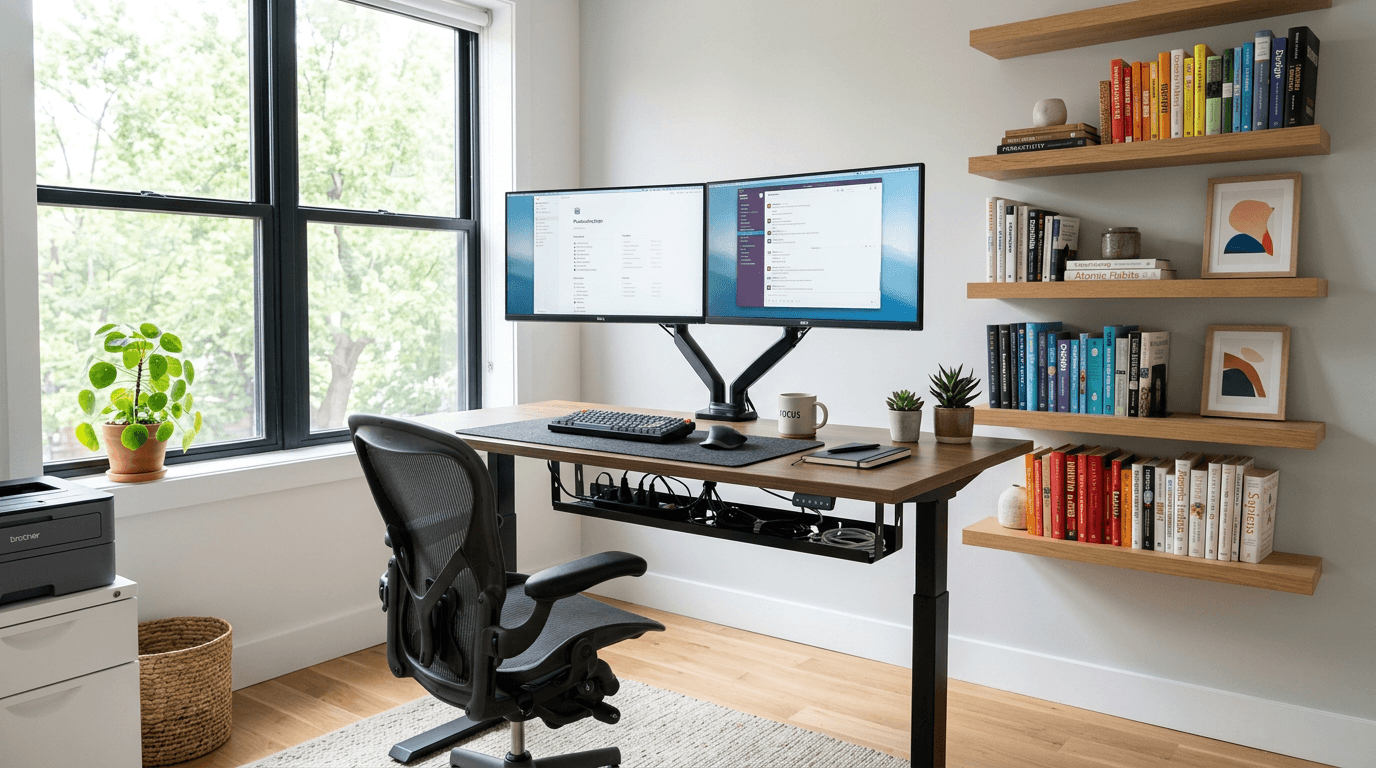
Remote and hybrid work is no longer a temporary arrangement for most people who adopted it — it is simply how they work. And a home office that was thrown together in a spare corner in 2020 is probably not cutting it anymore. You do not need a dedicated room or a large budget to build a workspace that actually supports focused work. You need thoughtful setup. Quick answer: The highest-impact home office upgrades are monitor placement, dedicated task lighting, proper shelving, and cable management. A handyman can handle all of them in a single visit — no contractor required.
We set up home offices throughout Rockland County — in the spare bedrooms of New City colonials, the finished basements of Nanuet splits, and the converted corners of Nyack Victorians. Here is the full picture of what goes into a workspace that works.
Choosing the Right Space in Your Home
The ideal home office has a door you can close. That one feature — the ability to mute the noise of the rest of the house and signal to others that you are working — makes more difference than almost any physical upgrade.
The obvious choice is a spare bedroom. But plenty of Rockland County homes do not have one to spare. Other spaces that work well:
- A large walk-in closet with shelves removed: surprisingly functional for focused solo work, with natural acoustic dampening from the surrounding walls
- A section of a finished basement: good separation from household activity, typically more square footage than a spare room
- An unused corner of a dining room: with the right furniture arrangement and a room divider or bookcase, this can read as a distinct zone
- A bonus room over a garage: often underused and well-insulated from the rest of the house
When evaluating any space, look at four things: natural light, proximity to power outlets and a strong WiFi signal, separation from high-traffic areas, and ceiling height (low ceilings in finished basements can feel oppressive over a long workday).
Desk and Monitor Setup: Ergonomics That Actually Matter
The single most common home office mistake is placing a desk so that the window is directly behind the monitor or directly behind the person sitting at it.
- Window behind the monitor = your eyes fight the glare all day
- Window behind you = you appear backlit and washed out on every video call
The correct position is light from the side — the window at your left or right. This gives your workspace natural illumination without creating glare on the screen or turning you into a silhouette on calls.
Once the desk is positioned, address the monitor. A monitor sitting on a desk surface is almost always too low for ergonomic use — the top of the screen should be at or slightly below eye level when you are seated upright. A wall-mounted monitor arm solves this and frees up the entire desk surface. We mount monitor arms and single monitors regularly as part of our home office setup service — it is the same basic work as TV mounting, and we bring the right anchors and hardware for your specific wall type.
If you prefer a desk monitor arm over a wall mount, the same principle applies: get the screen at the right height, positioned so you are not cranking your neck down or up.
Shelving and Storage: Making Vertical Space Work
Most home offices are short on surface space and long on clutter. The solution is almost always vertical: put things on the walls rather than on the desk.
Floating shelves above or beside the desk are the most versatile option. They hold books, reference materials, a printer, decorative items, or a second monitor. We install floating shelves into studs or with appropriate hollow-wall anchors depending on the load — see our shelving installation service for details.
Wall-mounted bookshelves flanking a window or doorway create the built-in look without the cost of custom cabinetry. This is a project we complete in a half-day to full day depending on the number of units.
Pegboard systems are underrated for home offices — they are modular, reconfigurable, and excellent for keeping frequently used items visible and accessible. We mount pegboard panels securely to wall framing so they hold without flexing.
For those who want a more finished look, a full closet system installation in a spare or dedicated office closet can add significant organized storage capacity. Read more about closet organization systems worth the investment if you are planning a larger storage overhaul.
Cable Management: Worth Doing Right
Cable chaos is one of the most consistent problems in home offices — and one of the most solvable. Here are the approaches we use:
- Desk-mounted cable trays: mounted to the underside of the desk, they route power strips, charging cables, and laptop cables out of sight
- Wall raceways: painted channels that run cables along the wall from desk height down to the nearest outlet — clean and paintable to match the wall color
- Grommets through the desktop: for desks with enough thickness, a grommet lets cables drop cleanly through the surface to a shelf or tray below
- In-wall cable routing: for a truly clean look, cables can be routed inside the wall between a higher outlet and a lower one — the result is a wall with nothing visible. Note: electrical work involving wiring changes requires a licensed electrician; we handle the aesthetic portions and can coordinate referrals when needed
The difference between a cable-managed office and an unmanaged one is significant — both visually and in terms of how the space feels to work in day after day. It is one of those improvements that seems minor until you have done it.
Lighting: Overhead Is Not Enough
Most rooms have adequate overhead lighting for general use. Home offices need more than that.
Task lighting — a desk lamp with adjustable brightness and color temperature — reduces eye strain during focused work and lets you dial back the overhead fixture when you want a less stimulating environment for reading or calls.
Video call lighting is a specific problem. A ceiling light directly above creates shadows on your face that make you look tired or underlit. A ring light or panel light positioned in front of you, at roughly face height, solves this immediately. We mount simple lighting fixtures and can add an outlet or power point at the right height if you want a more permanent solution — for outlet addition, we coordinate with a licensed electrician.
Natural light should be maximized where possible. Curtain and blind installation with adjustable treatments lets you control glare without losing daylight entirely.
A good lighting layering strategy for a home office: overhead for ambient, desk lamp for task, front-facing panel or ring for video calls. All three together are not expensive, and together they make a noticeable difference.
Sound and Privacy: Often Overlooked
Sound management matters for video calls, focus, and — in households with kids or pets — basic sanity.
Door type is the biggest lever. A solid-core door blocks substantially more sound than a hollow-core door. If your spare bedroom or office has a hollow-core door (standard in most tract homes built through the 2000s), replacing it with a solid-core unit makes a meaningful difference. We handle door installation and replacement throughout Rockland County. Read our full guide on door installation and replacement for more on what is involved.
Weatherstripping around the door frame reduces sound transfer further by sealing the gaps that let noise travel. This is a simple, inexpensive upgrade that takes under an hour.
Soft furnishings — a rug, upholstered chair, acoustic panels — absorb sound within the room and reduce echo. On video calls, rooms with bare floors and hard surfaces make you sound like you are in a bathroom. A rug and a bookshelf full of books go a long way.
What Does a Home Office Setup Cost in Rockland County?
The table below shows typical 2026 ranges for common home office upgrades installed by Odds & Ends. These are general estimates, not a quote. See our Rockland County handyman pricing guide for a broader breakdown.
| Upgrade | Typical Range |
|---|---|
| Monitor mount (wall or arm install) | $75 – $150 |
| Floating shelves (2–3 shelves) | $150 – $300 |
| Pegboard system installation | $100 – $200 |
| Cable management (raceway or tray) | $100 – $250 |
| Solid-core door replacement | $250 – $500 |
| Lighting fixture replacement | $100 – $200 |
| Full home office setup (multi-service) | $400 – $900 |
Frequently Asked Questions
Does a home office need to be a separate room? No. A dedicated room is ideal, but a well-designed desk nook in a finished basement, a large closet conversion, or a corner of a dining room can all function effectively as a home office. The key is having some physical separation — even a bookcase or room divider — and a door or partial barrier for noise control on calls.
What is the most important upgrade I can make to an existing home office? In most offices we see across Rockland County, the biggest quick wins are monitor height and lighting. Getting the screen to eye level and adding proper front-facing light for video calls transforms both your comfort and how you appear on calls. Neither requires major construction.
Can a handyman run cables inside the wall for a clean look? We can handle the aesthetic side — cutting access points, fishing cables through wall cavities, and patching and painting the wall back cleanly. If the project requires adding or moving an electrical outlet, that portion needs a licensed electrician, and we are glad to coordinate that referral. The overall project — tidy wiring, no visible cables — is absolutely achievable.
How long does a full home office setup take? A typical single-day visit covers monitor mounting, 2–3 floating shelves, cable management, and a lighting upgrade. More involved projects — door replacement, built-in shelving, closet conversion — take longer and may span two visits. We scope everything clearly at the free estimate so you know what to expect.
Should I invest in built-ins for my home office? Built-in shelving and a built-in desk add the most permanence and polish, and they make good use of awkward corners and alcoves. They cost more than floating shelves but less than custom cabinetry. For homeowners who plan to stay in their Rockland County home for several years and work from home consistently, built-ins are worth considering. See our built-ins service page and the post on built-ins that add value to Rockland County homes for more detail.
Let Us Set Up Your Home Office Right
Whether you need a monitor mounted, shelves installed, cables managed, or a full workspace built from scratch, we handle it all in one visit when possible. Call or text (908) 461-2688 or request a free estimate. We serve all of Rockland County — New City, Nyack, Pearl River, Nanuet, Suffern, Spring Valley, and everywhere in between.
Odds & Ends Handyman Service is a licensed Rockland County Home Improvement Contractor (#H-25-600), insured for $1,000,000, and in business since 2001 — serving the Town of Tuxedo, including Tuxedo Park, and all of Rockland County, NY.
Related